
Overview
Yep, I'm the person who caught a code error in the official React docs.
How I Found the Code Error
It was around 2 AM on March 22nd. I was studying the React component lifecycle through the new official docs and reached the part explaining that you can use ESlint to find the reactive value needed for re-synchronize. In that code example, I spotted an error. Here's the erroneous code:
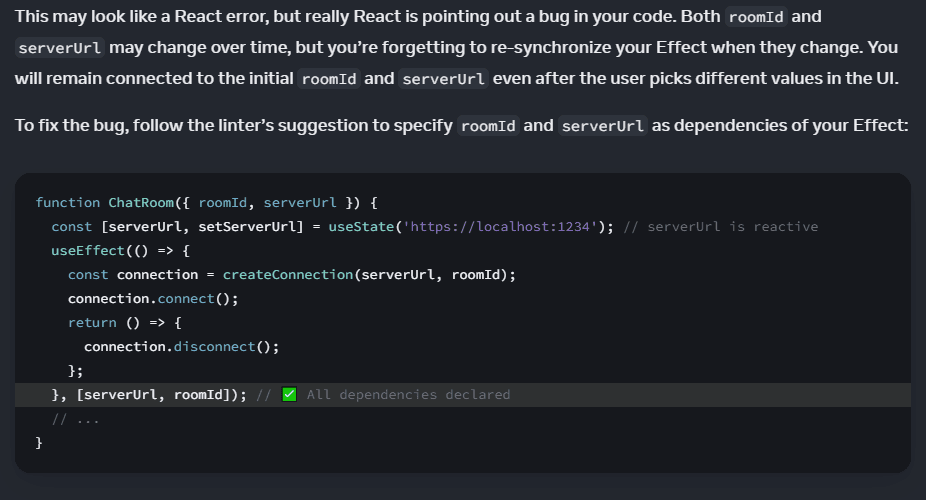
⁉️ Wait, do you notice anything strange?
What's strange is that the props entry serverUrl of the example ChatRoom component and the const-declared useState first return value serverUrl are the same name, so it's declared twice and conflicts!
function ChatRoom({ roomId, serverUrl }) {
  const [serverUrl, setServerUrl] = useState("https://localhost:1234"); // serverUrl is reactive

  // ...
}
The moment I found the error, I felt a strange kind of excitement.
Then I doubted my own eyes. A variable declared with const can't be reassigned, so would Dan Abramov really make a mistake like this?
I wanted to tell the React team right away, so my first instinct was to open a Pull Request, but I stopped to catch my breath.
What if I was the one who was wrong? I was about 90% sure it was an error (really).
Still, to be certain, I decided to run some tests.
✨ Let me be clear: I did NOT run these tests because I thought I might be wrong. 😆
Testing the Code Error
I tested the error in 6 different setups.
-
JavaScriptenvironment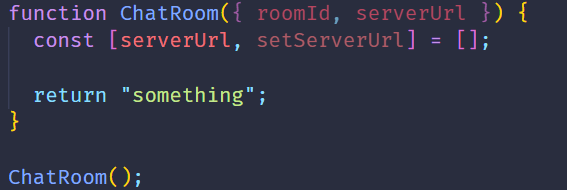
The
IDEdoesn't show any error in a JavaScript environment. But what happens at runtime?As soon as you run the code, you get the following
Syntaxerror.const [serverUrl, setServerUrl] = []; ^^^^^^^^^ SyntaxError: Identifier 'serverUrl' has already been declaredIn other words, the error says the identifier
serverUrlhas already been declared. That proves it's a definite error in a JavaScript environment. ✔️ -
TypeScriptenvironment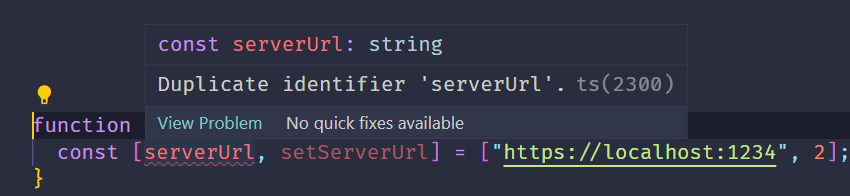
It shows a
Duplicate identifier 'serverUrl'error as soon as you write the code.
This shows how TypeScript reports errors at compile time rather than at runtime.
That proves it's a definite error in a TypeScript environment too. ✔️
After those two tests, I was convinced it was an error. But then I got curious what kind of error would show up in projects created with toolchains like vite and CRA.
So I tested those myself.
-
viteandJavaScriptenvironment
Even though it's clearly an error, nothing shows up in the editor. But when you start the dev server and open it on localhost, you immediately get the following errors.
// 첫 번째 에러
× cannot reassign to a variable declared with `const`
│ function ChatRoom({ roomId, serverUrl }) {
·                             ────┬────
·                                 ╰── cannot reassign
│ const [serverUrl, setServerUrl] = useState("https://localhost:1234"); // serverUrl is reactive
·          ────┬────
·              ╰── const variable was declared here

// 두 번째 에러
× the name `serverUrl` is defined multiple times
│ function ChatRoom({ roomId, serverUrl }) {
·                             ────┬────
·                                 ╰── previous definition of `serverUrl` here
│   const [serverUrl, setServerUrl] = useState("https://localhost:1234"); // serverUrl is reactive
·          ────┬────
·              ╰── `serverUrl` redefined here
The two errors mean the following:
- cannot reassign to a variable declared with
const- A variable declared with
constcan't be reassigned.
- A variable declared with
- the name
serverUrlis defined multiple timesserverUrlhas been defined more than once.
So it's an error in a vite-JavaScript environment as well. ✔️
- cannot reassign to a variable declared with
-
viteandTypeScriptenvironment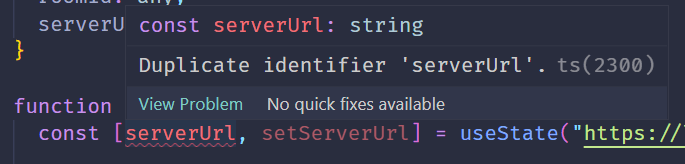
That error message looks familiar. It's exactly the same as in case 2. I wondered what would happen if I started the dev server.
X [ERROR] The symbol "serverUrl" has already been declaredUnlike case 3, the moment you run the command to start the server, the terminal tells you
serverUrlhas already been declared. So it's an error in a vite-TypeScript environment as well. ✔️ -
CRAandJavaScriptenvironment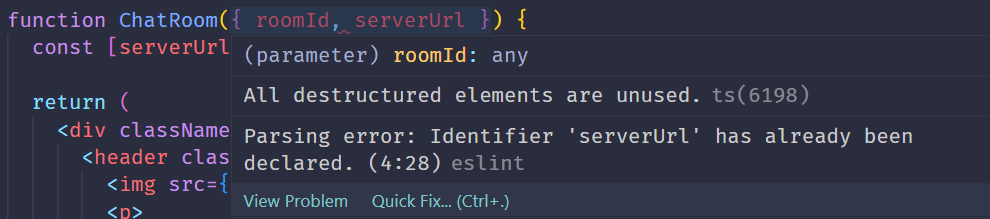
Did you notice a difference from the earlier JavaScript setups? It's
ESlint. ESlint is a static code analysis tool that checks syntax and rules. So why didn't ESlint catch the syntax error in the vite environment? Because vite doesn't come with ESlint installed.A React project bootstrapped with CRA has an ESlint config tailored for React installed by default. To see the installed packages, type
npm ls eslintin your terminal. You'll get something like this:npm ls eslint cra@0.1.0 └─┬ react-scripts@5.0.1 ├─┬ eslint-config-react-app@7.0.1 │ ├─┬ @babel/eslint-parser@7.21.3 │ │ └── eslint@8.36.0 deduped // ... │ ├─┬ eslint-plugin-jsx-a11y@6.7.1 │ │ └── eslint@8.36.0 deduped │ ├─┬ eslint-plugin-react-hooks@4.6.0 │ │ └── eslint@8.36.0 deduped │ ├─┬ eslint-plugin-react@7.32.2 │ │ └── eslint@8.36.0 deduped // ...Just like in case 1, it throws an
Identifier 'serverUrl' has already been declarederror. So it's an error in a CRA-JavaScript environment too. ✔️ -
CRAandTypeScriptenvironment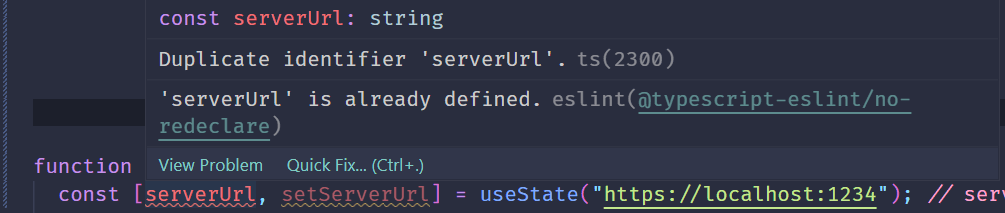
Just like the earlier TypeScript tests, it throws a
Duplicate identifier 'serverUrl'error.
You can also see ESlint's'serverUrl' is already definederror message here.
So after running every test, it was clear that the code in the official React docs is syntactically wrong.
Once the tests were done, I was confident the example really was mistaken. Now it was time to officially open a Pull Request.
Opening My First-Ever Pull Request to an Open Source Project
I had created a Pull Request plenty of times in my own projects, but never to an open source project.
Since it was my first time, I was pretty nervous. And it wasn't just any open source project, it was the official React docs! 😵
I retraced how I'd always used GitHub and created the Pull Request.
Here's the process.
1.React.dev Fork
First, I forked the docs repo to my personal repo.

2. Commit and Push
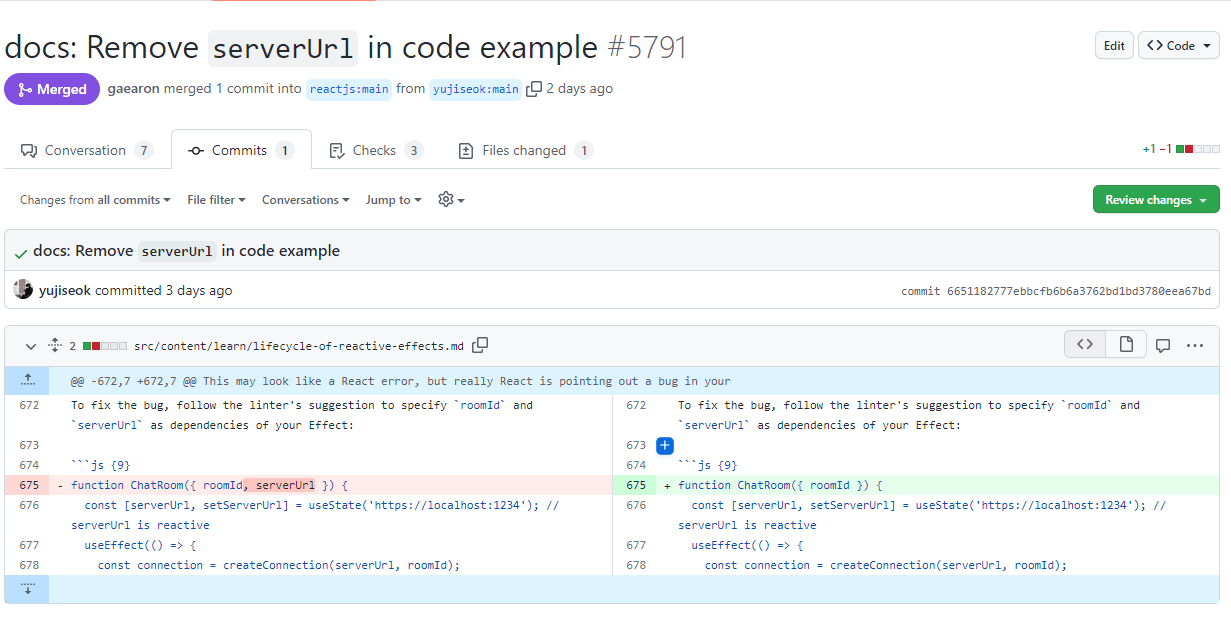
First, I committed and pushed my changes to my personal repo. For the commit message, I tried my best to follow Conventional Commits.
3. Create the Pull Request
Since the changes only existed in my personal repo, I created a PR against the original repository.
This is what I wrote in the PR:
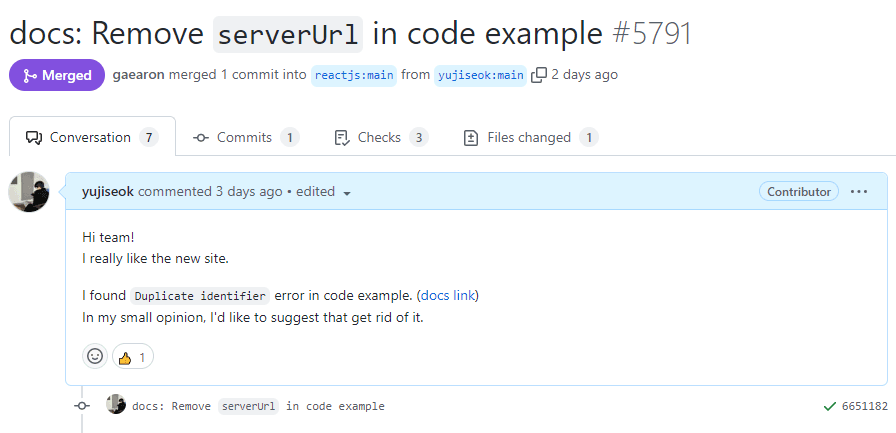
✨ I tried to write the PR as politely as I could, in my own way.
My heart was pounding. I thought all that was left was to wait for my PR to be reviewed and merged. But there was one more step.
4. Contributor License Agreement
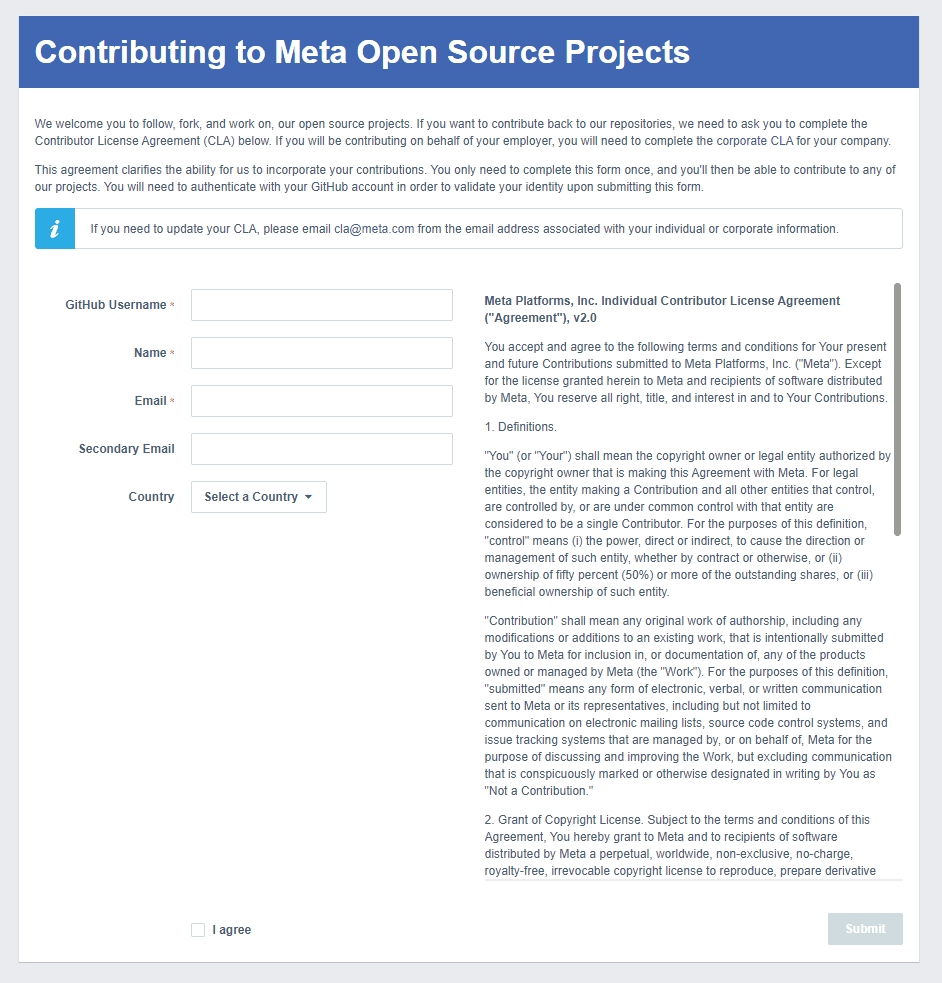
The facebook-github-bot left a comment saying every contributor has to agree to the Contributor License Agreement,
and that it would verify and add the CLA tag an hour later.
5. Merged
It was really late, so I lay down in bed thinking I'd sleep and check in the morning, but I couldn't fall asleep at all. Then my phone buzzed with a notification. I checked it, hoping it was what I thought it was, but it was a comment from another user. What a letdown. They were asking whether the error might have been intentional.

I decided to answer after waking up and tried to sleep. Like when you were a kid on a field trip day, I woke up unusually early.
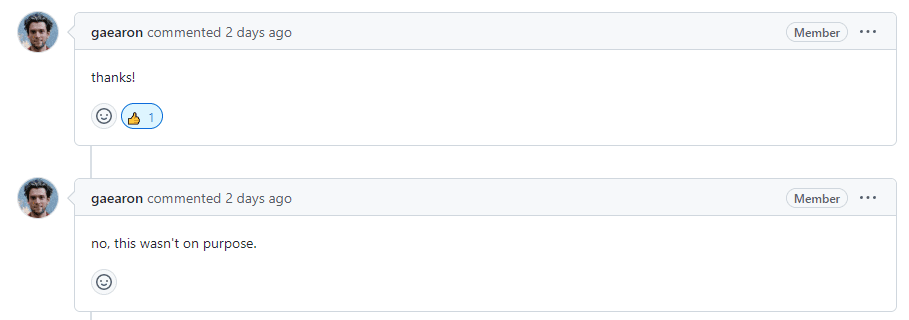
And what do you know! Dan Abramov himself had replied to the other user's question on my PR and left a thanks comment. And of course, my PR was merged too!!
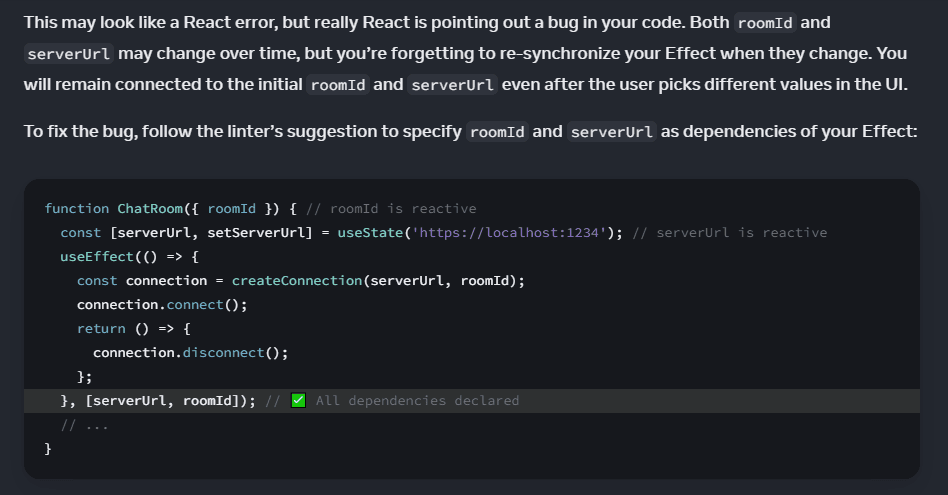
It was reflected in the official docs right away. 😆
You can check out the merged PR here!
Reflections
Going through this contribution process, I took away a few things. First, I can now read code and spot problems in it. Being able to read and understand not just my own code but other people's code means a lot to me. I also feel much more comfortable with Git now. And I learned that anyone can make mistakes, so there's no reason to be discouraged by them. It's hard to produce a perfect result in one go, and I really felt through this experience that taking in many people's opinions to build something better is the way to go.
Above all, the most meaningful and best part for me was getting a "thanks" comment from Dan Abramov, a developer I admire, and seeing my code reflected in the official docs. It's a truly overwhelming feeling!
I don't want this to be a one-off. I want to keep contributing to open source projects whenever I can. Working on projects for myself is great, but contributing really feels like a whole other world.
Through this contribution, I learned that beyond just writing code, you can grow and broaden your perspective in other ways too, which makes it a truly valuable experience. I'm really proud, and I want to move forward even further based on this experience.
✨ It's a secret that I bookmarked the PR link and look at it several times a day. 🤫