Overview
While studying and using React, I realized I had never really thought about how React actually works. I figured that if I understood how React works under the hood, I could get a lot more comfortable with it. So I decided to dig into how React works and into the Fiber architecture.
How React Works
To understand how React works, let's first look at how a component gets rendered.
How JSX Works
React components use JSX, a syntax extension of JavaScript. With JSX, you can write markup inside a component using syntax that looks a lot like HTML.
The extended syntax also lets you express React's tree structure.
JSX isn't valid JavaScript, so it has to be converted into JavaScript that the browser can understand.
This conversion is done with Babel or TypeScript.
The way JSX gets transformed differs before and after React 17.
The Old JSX Transform (Before 17)
import React from "react";

const Hello = () => {
  return <div>Hello, World! 🌏</div>;
};
Running the code above through Babel gives you this:
import React from "react";

const Hello = () => {
  return React.createElement("div", null, "Hello, World! \uD83C\uDF0F");
};
The old approach transforms JSX by calling the React.createElement function.
If you can't use JSX, you have to write things by hand with the createElement(...) function, like this:
import React from "react";

const List = () => {
  return React.createElement(
    "ul",
    null,
    React.createElement("li", null, "Charli"),
    React.createElement("li", null, "Fred"),
    React.createElement("li", null, "Dua"),
  );
};
It's fine for a simple component, but the thought of hand-writing a deeply nested component with createElement makes my head spin. 😵💫
The transformed createElement function takes three arguments, like this:
React.createElement(type, props, ...children);- type: the element's type (an HTML element like div, ul, or li, or a React component)
- props: the element's properties (attributes like className, style, and onClick)
- children: the element's children (a string, an element, or a component)
createElement returns a plain JavaScript object called a React element.
In other words, JSX gets replaced with a React element object.
{
  type: "ul",
  props: {
    children: [
      { type: "li", props: { children: "Charli" } } key: null ref: null,
      { type: "li", props: { children: "Fred" } } key: null ref: null,
      { type: "li", props: { children: "Dua" } } key: null ref: null,
    ]
  },
  key: null,
  ref: null,
  // ...
}
This object doesn't show up on the screen (the real DOM), but it holds the information needed to put things on the screen. React reads this object, creates HTML elements in the virtual DOM tree, and then syncs them with the real DOM.
The createElement function wasn't designed to implement JSX. It was meant for writing HTML elements by hand. Using it this way comes with a few problems.
- Since JSX is transformed into createElement calls,
Reacthas to be in scope. In fact, you shouldn't really need to import React just to use JSX. - Because the function looks at dynamic properties, it adds unnecessary cost at runtime.
- There are also other performance issues and room for improvement.
The JSX Transform After React 17
To fix these problems, the React team worked with Babel and introduced a new JSX transform. Its advantages are:
- You can use JSX without explicitly importing React.
- It produces a smaller bundle size.
- It lowers React's learning curve.
Transforming JSX with the new compiler gives you this:
import { jsx as _jsx } from "react/jsx-runtime";

const Hello = () => {
  return /*#__PURE__*/ _jsx("div", {
    children: "Hello, World! \uD83C\uDF0F",
  });
};
Since the import happens automatically, you no longer need to import React yourself.
This transform always passes children as a prop, and passes the key separately from the other props.
Running
npx react-codemod update-react-importsremoves the unnecessaryimport React. 🗑️ When you run this command, it strips out the React import that was only there for JSX, and changes code in the form ofimport React from 'React'intoimport { useState } from 'react'.
The React element instances produced by this transform are managed as a tree (a JavaScript object).
React's Tree Structure
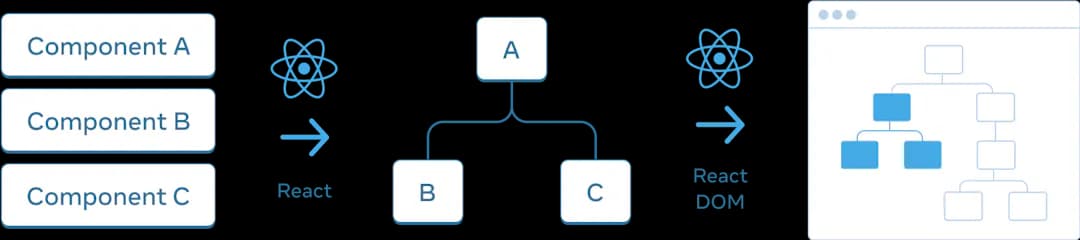
Browsers build tree structures using the DOM (Document Object Model) for HTML and the CSSOM for CSS. React likewise models the UI as a tree. This tree holds the relationships between components (parent, child, sibling) along with their information.
React's Rendering Process
React renders the UI based on the application's state and props. The rendering process breaks down into three main steps.
1. Triggering a Render
A render gets triggered under the following conditions.
-
The application's first render (
Initial Render)- When the app first starts, React performs the initial render.
- It creates the root with
createRootand renders withrender.
-
A re-render when state or props change (
setState)- Calling the setState function can trigger a re-render.
- When a change happens, React adds it to the render queue.
2. The Render Phase
Once a render is triggered, React calls your components to figure out what should show up on the screen. In other words, in React, rendering means "calling a component, which is a function."
View = Function(Data);This phase continues recursively until there are no more layers below. On the first render, React creates DOM nodes; on a re-render, it compares against the previous render and updates only what changed.
3. The Commit Phase
Once rendering is done, React moves on to the commit phase. The commit phase is where the changes actually get applied to the real DOM.
On the first render, React uses the appendChild() DOM API to place all the DOM nodes on the screen.
When a re-render happens after that, it updates only the DOM nodes that actually changed.
In short, only the DOM nodes with changes get updated.
🎨 Rendering in React is closer to calling a function, so it's different from the browser's idea of rendering (painting).
Reconciliation
When React first appeared, I'm told its killer feature was the virtual DOM. The virtual DOM is a JavaScript object that lives in memory. Reconciliation uses this virtual DOM: it's the algorithm that compares the previous virtual DOM tree with the new one to find the changes that need to be applied to the real DOM.
The DOM is just one of the environments React can render to. iOS and Android views are also targets React can render to (pluggable renderers). So the name "virtual DOM" applies only to the browser's DOM, and it may not be a perfect fit for the name.
The goals of reconciliation are:
- Minimal DOM manipulation
- Performance optimization
- Providing a declarative API
In the render phase above, it's this reconciliation that lets React figure out what changed.
The reconciliation process goes like this:
-
Create a new element tree
- When a component's state or props change, a new React element tree is created.
-
Comparison (Diffing Algorithm)
- The newly created React element tree is compared with the previous element tree.
- Compare the types of the two elements
- If the two elements have the same type, compare their attributes and apply any changed attributes or props.
- If the types differ, the old element is removed and a new element tree is built.
- The
keyprop lets React identify which child elements need to change during rendering.
Through this process, React manages the DOM by creating plain JavaScript objects, so it can handle rendering at a lower cost than manipulating the real DOM directly. However, the original reconciler (the stack reconciler) had its own problems.
The Stack Reconciler (Before 16)
The stack reconciler handles work using a stack data structure. A stack follows the LIFO (Last In, First Out) principle. That means the last piece of data added is the first one removed. When tracing program execution, we use the call stack. JavaScript also handles work with a call stack. When a function runs, a new stack frame gets pushed onto the stack. A stack frame represents the work done by that function.
Handling reconciliation with this kind of stack structure came with these problems:
- Render blocking
- Render blocking means no other work can be done until rendering finishes.
- The stack reconciler works synchronously, so nothing else can run until rendering is complete.
- Degraded animation performance
- DOM updates and animations are delayed until the rendering work finishes. As a result, users may see choppy animations.
- No prioritization and no interrupting work
- Since all work is processed synchronously, you can't prioritize work or interrupt it.
- Recursive traversal
- The stack reconciler traverses recursively, and on every update it builds the component tree from top to bottom.
- The deeper the tree gets, the more recursive traversal there is, which slows down rendering and increases memory usage.
The stack reconciler works well enough for small, simple applications, but it isn't a good fit for large ones. To solve these problems with the stack reconciler, the React team introduced the Fiber architecture.
The Fiber Architecture
The Fiber architecture was introduced to improve how React works internally. Fiber is a complete rewrite of reconciliation, but the algorithm is very similar.
Fiber's core goal is to let React take advantage of scheduling, and it makes the following possible:
- Pausing work and coming back to it later
- Assigning priorities to different kinds of work
- Reusing work that was already completed
- Aborting work that's no longer needed
With these capabilities, React can coordinate component rendering based on importance. Rather than the traditional call stack concept, you can think of a fiber as a virtual stack frame specialized for React components. Because the stack is reimplemented this way, stack frames can be kept in memory and executed whenever needed.
In other words, a fiber is a unit of work with its own virtual stack. A fiber node effectively manages a component's state, props, and DOM elements.
Fiber Nodes
A fiber node is the basic unit of the Fiber architecture, and each component element corresponds to one fiber node. These nodes are linked together to form the fiber tree, which mirrors the structure of the component tree.
The Structure of a Fiber Node
A fiber node holds a stack frame and an instance of a React component. A fiber node has the following properties.
- Type
- Key
- Child
- Sibling
- Return
- Alternate
- Output
Type
Type is the term for the component itself. For a composite component, the type is the function or class itself. For a host component, the type is the name of the HTML tag.
Composite components and host components
A composite component is one you define yourself using HTML tags. e.g.<App />
A host component is one that maps directly to an HTML tag. e.g.<div>,<span>
Key
The key is a component's unique identifier. When there are several components of the same type, React uses the key to tell them apart. It's used to identify which component has changed.
Child and Sibling
These properties are fiber pointers, and they describe the recursive tree structure of fibers.
The child fiber represents the value returned by a component's render method.
const Artist = () => {
  return <div>Charli</div>;
};
The child of the <Artist> component is set to the <div>.
A sibling fiber represents the case where multiple children are returned.
const Artists = () => {
  return [Artist1, Artist2];
};
In this case, Artist1 and Artist2 are set as sibling fibers.
Return
This holds the information the program should return to after the fiber node currently being processed is finished. Conceptually, it's similar to the return address of a stack frame. It gives the fiber node a link back to its parent.
pendingProps and memoizedProps
You can think of props as a function's arguments.
pendingProps represents the props currently being processed and is set at the start of execution, while memoizedProps holds the previously processed props and is set at the end.
If the processed pendingProps and memoizedProps are the same, the fiber reuses its existing output.
This kind of reuse prevents unnecessary work.
pendingWorkPriority
pendingWorkPriority is a number representing the priority of the work assigned by the fiber.
Except for NoWork, which is 0, a higher number means a lower priority.
Alternate
A component instance always has two fibers: the current fiber and the work-in-progress (wip) fiber. The two fibers are each other's alternates: the wip fiber is the alternate of the current fiber, and the current fiber is the alternate of the wip fiber. Rather than always creating a new object, a fiber reuses its alternate if one exists.
A wip fiber is a fiber that hasn't been completed yet. Conceptually, it's a stack frame that hasn't returned yet.
Output
This is the output of a fiber at a leaf node of the React app. It means the function's return value. Every fiber has an output, but it's only created at leaf nodes by host components. That output is then passed up the tree.
What Fiber Does
When a component is called and rendered, that component's element tree is created. The tree React keeps at this point is the fiber tree.
The fiber tree is an object, and React compares types as it goes into and comes back out of each element in the tree. (render phase)
It traverses recursively until a fiber has no more children. (beginWork - completeWork)
Once all the render-phase work is done up to the root, the fiber moves into the commit phase.
When starting an update, React represents the state that's about to change through the workInProgress tree.
In the commit phase, the fiber sets the current tree to the workInProgress one and applies only the changed parts to the real DOM.
In other words, it reuses the parts of the previous tree that didn't change, which makes smooth screen transitions possible.
Conclusion
While writing React code, I knew that JSX gets transformed, but I took it for granted that it was rendered straight to the DOM. In reality, JSX is converted into JavaScript by Babel, then turned into React element objects, and those objects are what get applied to the real DOM.
Fiber works hard on our behalf, traveling from the root of the tree down to the leaf nodes, finding what changed and updating only those parts. Fiber also assigns priorities to work and handles the important work first, giving users a smoother UI and a better experience. Following Fiber's journey like this has helped me use React more effectively.
I only knew on the surface that React could render far more economically than manipulating the real DOM directly, and I learned that underneath, all of these secret workings were going on.
Sources
- https://reactjs.org/blog/2020/09/22/introducing-the-new-jsx-transform.html
- https://babeljs.io/blog/2020/03/16/7.9.0#a-new-jsx-transform-11154
- https://react.dev/learn/understanding-your-ui-as-a-tree
- https://react.dev/learn/render-and-commit
- https://reactjs.org/docs/reconciliation.html
- https://github.com/acdlite/react-fiber-architecture
- https://www.youtube.com/watch?v=aS41Y_eyNrU